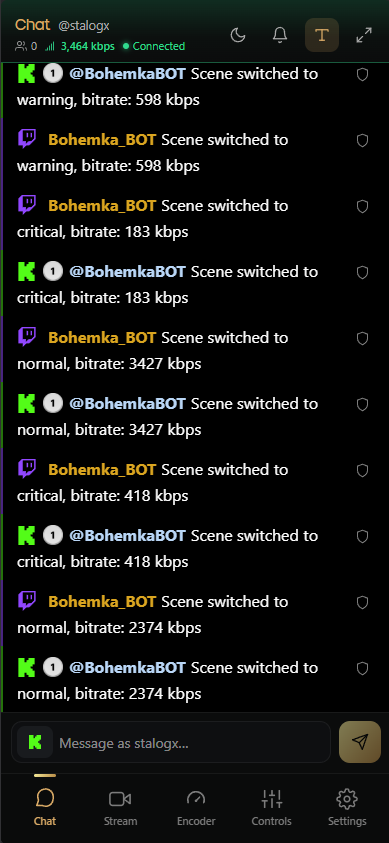
Every streaming plan — Relay and CloudOBS — includes BohemkaBOT Remote, a direct-control web app built specifically for IRL streamers.
It's a simple, powerful tool for managing your chat, moderation, and live alerts right from your phone while you're on the move.
Unified chat
See and run both of your chats from one screen.
Twitch & Kick combined — live messages from both platforms in one clean feed.
Moderation — time out, ban, or delete messages on either platform.
Send messages — reply to your chat directly from your phone, to Twitch, Kick, or both.
Multiple Chats — add other streamer's chat, ideal while streaming with someone.
Remote control of BohemkaBOT
Run your bot without typing a single command in chat.
Execute commands instantly — switch scenes, fix your stream, and more with one tap.
Change settings on the fly — adjust bitrate thresholds, privacy scenes, and other BohemkaBOT settings without touching your PC.
Stay in control of your stream
Keep everything you need in front of you while you're out in the field.
Live stats — your bitrate is always on screen, so you can see at a glance whether the stream is running smoothly.
Live preview — watch your raw camera feed or the direct Twitch/Kick stream.
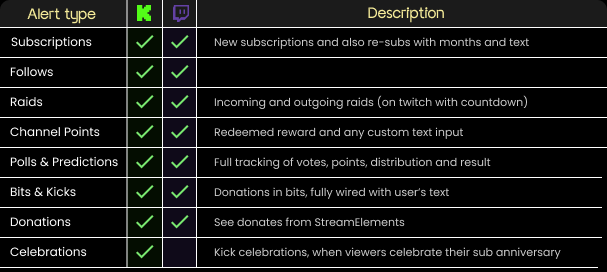
Alerts — See below what alerts are currently wired for both platforms.
Alert box — drop your alert-box links into the settings and they'll play over your chat with sound, so you never miss a moment.
Notification box - see alerts in chat-like window above chat, you can enable it in the bell icon.
Text-to-speech — enable TTS to have new chat messages read aloud.
Alerts
See what alerts are currently wired for both platforms:
How to get started
Go to bot.bohemka.eu and log in with your bot token. You'll find it in the billing dashboard — click Manage on the service you purchased.
Open the Stream tab and authorize the platforms you stream on (Twitch and/or Kick).
To use BohemkaBOT's features (commands, scene switching, settings), make sure the desktop app is running too.
That's it — you're ready to run your whole stream from your pocket.